
Organic Traffic Dropped After a Google Core Update? How to Diagnose It


By Angelica · Updated November 25, 2026
The November 2026 Google core update finished rolling out on November 24, 2026, after 13 days and 20 hours, and about an hour later Google announced a December 2026 core update. If your organic traffic fell in the past two weeks, hold off on rebuilding the site. Google asks site owners to wait at least one full week after a rollout completes, then compare that week with the week before the update started.
Use the wait to rule out other causes. Google's debugging guide lists six groups of reasons for a traffic drop. An algorithm update is only one.
Key takeaways
- The November 2026 core update ran November 10 to 24 (Pacific time). The right comparison is one week after completion against November 3 to 9.
- Google preannounced the December 2026 core update on November 24. As of November 25, 2026, it hasn't started and has no date.
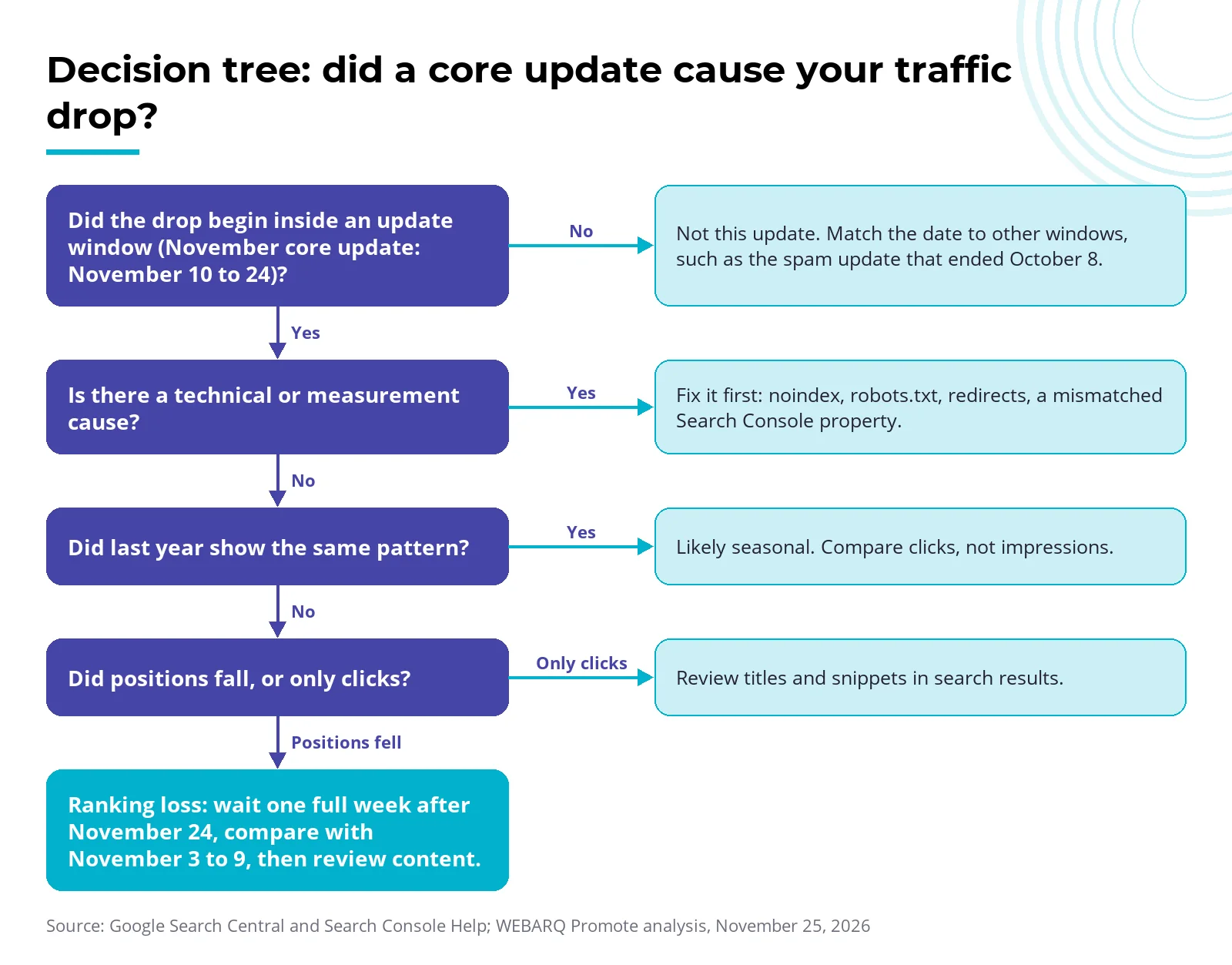
- Before blaming the update, check four things: the date the drop began, technical and measurement problems, last year's seasonal pattern, and whether you lost rankings or only clicks.
- For year-over-year checks, use clicks. Search Console didn't report impressions accurately from May 13, 2025, to April 27, 2026.
What is a Google core update, and how is it different from a spam update?
A Google core update is a significant, broad change to Google's search systems and algorithms, made several times a year and listed in Google's ranking updates. According to Google Search Central's core updates page, the changes are broad and don't target specific sites or pages. Google also says most sites don't need to worry.
Google's analogy is a list of 20 favorite restaurants written in 2019 and reordered a few years later, as new places open and old ones are reassessed. A restaurant that moves down isn't automatically bad.
Spam updates are a different thing. Google's spam detection runs all the time, and Google announces a spam update when it makes a notable improvement to those systems, such as SpamBrain. Affected sites are told to review the spam policies. For link spam there's a hard caveat: ranking benefit from spammy links that has been removed won't come back, whatever you fix.
Then there's December. The Search Status Dashboard entry is an "Information" item that says only that the update is "scheduled to be released in December 2026". Google says it focuses on ranking relevant content for longer, more complex questions, and on tailoring results more closely for users who have opted into personalization. As of November 25, 2026, the rollout hasn't started, there's no date, and no one can yet judge its effect.
When did Google release updates in 2026?
Google's dashboard lists nine ranking entries for 2026: three completed core updates, one just announced, four spam updates and one Discover update. Use the table to line up your drop date with each window.
| Update | Type | Start (PT) | End (PT) | Duration on dashboard | Notes |
|---|---|---|---|---|---|
| February 2026 Discover update | Discover | Feb 5 | Feb 27 | 21 days 17 h | Discover only; English-language users in the US at release |
| March 2026 spam update | Spam | Mar 24 | Mar 25 | 19 h 30 min | |
| March 2026 core update | Core | Mar 27 | Apr 8 | 12 days 4 h | |
| May 2026 core update | Core | May 21 | Jun 2 | 11 days 21 h | |
| June 2026 spam update | Spam | Jun 24 | Jun 26 | 2 days 1 h | Ended Jun 27 in Jakarta time (WIB) |
| August 2026 spam update | Spam | Aug 18 | Aug 21 | 2 days 16 h | |
| September 2026 spam update | Spam | Sep 24 | Oct 8 | 13 days 16 h | Ran into early October |
| November 2026 core update | Core | Nov 10 | Nov 24 | 13 days 20 h | Started Nov 11 in WIB |
| December 2026 core update | Core | Not started | – | – | Announced Nov 24; scheduled for December 2026, no date |
Method: WEBARQ Promote analysis, November 25, 2026. Sources: the "Ranking" history on the Google Search Status Dashboard, each incident page, and the dashboard's JSON feed for start and end times. Dates are in Pacific time (PT), which Search Console also uses. In WIB, a date can shift by one day.
The 2026 core updates took between 11 and 14 days, inside the "up to 2 weeks" Google stated at release. The September spam update ended October 8, 33 days before the November core update began. A drop that started in late September or early October sits closer to the spam update.
Did your traffic really fall because of the core update?
Not necessarily. Run three checks first: whether the drop began inside an update window, whether there's a technical or measurement cause, and whether the same pattern happened last year. If all three come back clean and the drop sits inside a core update window, a content review makes sense.
Match the drop date to the update windows
Find the first day the daily chart in Search Console turns down. Search Console uses Pacific time, like the dashboard, so dates compare directly with the table. A drop that began on November 5 can't be explained by an update that started on November 10.
Rule out technical and measurement causes
In the author's judgment, a sharp one- or two-day drop should be checked first as a technical or tracking problem. Check for a misplaced noindex, robots.txt, redirects, a domain or URL migration, and server availability. One caveat from Google: a noindex problem can make traffic fall slowly, because it only takes effect once Google recrawls the pages. For a fuller checklist, see our piece on technical SEO.
Measurement problems also pass for traffic drops. Search Console Help names a property that doesn't match the site address, such as mixing up http and https, as probably the most common reason for "missing" traffic. Search Console and Google Analytics never match exactly, but a drop that shows up in only one of them is a measurement suspect first.
Check the Search Console data anomalies page too. As of November 25, 2026, it lists a logging error that lowered impressions in the Generative AI report on November 9 to 11, 2026, right at the start of the core update.
Compare with last year
Google's guide to debugging traffic drops suggests setting the date filter to "Last 16 months" so you see the drop against seasons and trends, plus checking interest in your top queries on Google Trends. November 10 to 24, 2025, didn't overlap any update on the dashboard, so last year makes a fairly clean baseline.
There's a trap here. Google says impressions weren't reported accurately from May 13, 2025, until a fix on April 27, 2026, and that impressions, CTR and average position were affected, not clicks. So for year-over-year comparisons, use clicks.
Add the Indonesian context yourself (this is the author's judgment, not Google data). Ramadan, the 11.11 sales that fall inside the November update window, Harbolnas on 12.12 and the year-end holidays can all shift search interest in some categories.
How do you diagnose the drop in Google Search Console?
Compare two equal periods in the Performance report, then break the change down by page, query and search type. The steps follow Search Console Help as of November 25, 2026; labels may vary by interface language.
- Make sure the property matches your site address (Domain or URL-prefix, http or https).
- Open Performance > Search results and set the date to "Last 16 months".
- Look at the main chart: are impressions and clicks both down, or only clicks?
- Open the Date filter, the Compare tab, then Custom. For the November core update, compare seven full days after November 24 with November 3 to 9.
- On the Pages tab, sort by the clicks difference. An even drop means sitewide; if a handful of pages account for most of it, start there.
- On the Queries tab, split branded and non-branded queries with the branded queries filter, or with "Queries containing" or a Custom (regex) filter on your brand name.
- Switch Search type one at a time (Web, Image, Video, News), since Google asks you to analyze them separately.
- For a sitewide or sudden drop, open Page indexing, Crawl stats, Security issues and Manual actions. For a few pages, use URL Inspection.
- Export the views with their dates, or keep long-term history through the Search Analytics API or bulk data export.
On the window in step 4, Google doesn't define the exact day boundary. Our reading: wait until the data holds seven full days after November 24, plus the two to three days Search Console takes to fill in. Because the December update is scheduled with no date, your measurement window may overlap the next rollout.
The branded classification comes from an AI-assisted system, so some queries may be misgrouped, and the filter only appears for top-level properties with enough query volume. In the author's judgment, if branded clicks fell, look at brand demand, campaign timing and season. If non-branded clicks fell along with positions, that points to a ranking problem. Our guide to monthly Google Search Console reports covers the routine format.
Did you lose clicks or lose rankings?
Separate the two, because they call for different responses. If impressions hold but clicks fall, Google says your title and snippet may be less appealing, or other results may show more attractive rich results. If positions fell, that's a ranking loss.
AI features add a layer. Clicks, impressions and position from AI Overviews and AI Mode are counted in the Performance report under the Web search type, and each AI Overview counts as one position for all of its links. The Generative AI performance report shows impressions only and may not appear if your site has too few impressions in AI features.
In WEBARQ Promote's test on October 22, 2026, an AI Overview appeared on 22 of 30 Indonesian business queries (73%) on mobile Google. That's a one-day snapshot, not a market figure, but it shows why falling clicks with steady positions don't necessarily mean lost rankings.
If positions did fall, use Google's scale. A move from position 2 to 4 counts as small, and content that already works should be left alone. A move from 4 to 29 counts as large and needs a deeper look. Google gives both as examples, not official thresholds.
What should you do, and not do, after the update?
For a small drop, the best move is usually to leave the content as it is. For a large, sustained, sitewide drop, Google asks for an honest assessment using its self-assessment questions for helpful content, ideally also by trusted people who aren't affiliated with your site.
| Do | Avoid |
|---|---|
| Confirm the update has ended and note its start and end dates | Judging a drop while the rollout is still running |
| Wait at least one full week, then compare with the week before the update | Comparing periods of different length or shifted dates |
| Review top pages and queries; separate Web, Image, Video and News | Treating a small position change (Google's example: 2 to 4) as an emergency |
| For a large sitewide drop, assess the whole site and the hardest-hit pages | Changing page elements because of SEO rumors ("quick fixes") |
| Improve content in ways that matter: rewrite, restructure, clarify navigation | Deleting content as a first move; Google calls it a last resort |
| Treat spam updates separately: check the spam policies and Manual actions | Changing article dates to look fresh without changing the content |
Google says that changing dates without substantial edits, or adding and removing lots of content just to look "fresh", doesn't help. Padding articles doesn't either: Google has no preferred word count.
How long does recovery take, and what do you tell the board?
Google gives no fixed timeline. Some changes take effect within days, but its systems may need several months to learn that your site is consistently helpful. If months pass with no change, the next core update is a reasonable time to look again, with no guarantee either way.
For the board, an honest report fits in three lines. What fell: non-branded clicks, specific pages or the whole site. Which causes you've ruled out: technical, measurement, seasonal, spam update. When you'll measure again: after the first comparison week, then a few weeks after any content changes, as Google's debugging guide suggests.
Checklist for this week:
- Note the first day of the drop and match it to the 2026 update table.
- Check the property, noindex, robots.txt, redirects and the data anomalies page.
- Compare clicks with the same period last year.
- Set up a comparison of seven days after November 24 against November 3 to 9, then wait for complete data.
Frequently asked questions
How long should I wait before analyzing traffic after a core update?
At least one full week after the rollout completes, then compare that week with the week before the update began. The November 2026 update finished on November 24, so the baseline is November 3 to 9 (Pacific time). Google doesn't define the exact day boundary, and Search Console data arrives two to three days late.
Is a ranking drop after a core update a penalty?
No. Google describes core updates as broad changes that don't target specific sites or pages. A page that drops isn't necessarily bad; other pages may now be judged more helpful. The penalty-like action is a manual action, which shows in the Manual actions report.
Should I delete pages that lost traffic?
Usually not. Google treats deletion as a last resort for content that can't be salvaged. Start by rewriting or restructuring the page so it serves readers better. If a whole section feels deletable, Google says that may signal it was made mainly for search engines.
Can traffic recover before the next core update?
It can, but nothing is guaranteed. Some changes take effect within days, while Google's systems may need several months to learn that a site is consistently helpful. Smaller, unannounced core updates also happen. If months pass with no change, the next core update is a reasonable point to reassess.
What's the difference between a core update and a spam update?
A core update broadly changes how Google assesses relevance and helpfulness, with no target site. A spam update improves automated spam detection such as SpamBrain and ties to the spam policies. If your drop falls inside a spam update window, check those policies and Manual actions first.
Want a second pair of eyes on your Search Console data before you change any content? The WEBARQ Promote SEO team can map the cause of the drop first.