

Google Business Profile for Multi-Location Companies: Managing Locations, Reviews and Consistent Data



By Angelica · Updated November 8, 2026
For a company with 10 or more branches, the hard part of Google Business Profile is rarely the listing itself. It's deciding who may rename a branch, who answers reviews and who removes leavers' access. Google offers bulk verification at 10 or more locations, but sets no reply deadline and doesn't sell local rankings. This playbook is for banks, clinics, dealerships and retail chains with dozens of branches, not single-shop owners.
Key takeaways
- Bulk verification is open only to 10+ profiles of one business, and duplicate or suspended profiles don't count (per Business Profile Help, November 2026).
- Give owner rights to two people at head office, because the primary owner can't leave until ownership is transferred. Branches and agencies only need manager access.
- There is no Google deadline for review replies. One working day for negative reviews and three for positive ones are our recommended targets.
- In 30 mobile SERPs for "category + city" queries (WEBARQ Promote analysis, November 8, 2026), a local pack appeared on 28. Directories and marketplaces held 23.7% of organic slots, brand-owned sites 31.2%.
What changes when Google Business Profile covers dozens of branches?
Google Business Profile is Google's free tool for managing business information on Search and Maps; in Indonesia it was previously called Google Bisnisku, according to Google Ads Help. A 30-branch network has 30 profiles that dozens of people can edit.
Google's guidelines ask every location in a country to use the same name, and locations offering the same service to share categories. A tagline or neighborhood added to the business name can get a profile suspended.
Branches outside Jakarta are not a small market. The APJII 2025 survey, as reported by detikInet, counted 229.4 million internet users, a penetration rate of 80.66%, with Java at 84.69% and Sumatra at 77.12%. The e-Conomy SEA 2025 report by Google, Temasek and Bain & Company expects Indonesia's digital economy to reach almost US$100 billion in GMV in 2025, up 14%.
Who owns what? A governance model for head office, branches and agencies
Head office holds ownership; branches and agencies work as managers. That's our recommended setup, built on the roles Google defines for business group owners and managers in Business Profile Help.
Accounts, business groups and access rights
A business group is a set of profiles that several users manage together, like a shared folder, and Google recommends it over sharing a password. Every group owner or manager can access every profile in it. Each user needs their own Google Account; Google Groups can't be owners or managers.
That matters at scale: a branch head added as a group manager can edit every branch. Give branch staff manager access on their own profile only, which Google allows outside the group list.
One group gives one dashboard, but every user sees every profile. Several groups keep teams apart, each with its own spreadsheet. Google advises one group per brand, split only when divisions need different teams.
Column two is Google's rule (per Business Profile Help, November 2026); the last three columns are our recommendation.
| Task | What Google allows | Head office | Branch | Agency |
|---|---|---|---|---|
| Add or remove users, transfer the group | Group owner only | Yes, two owners | No | No |
| Name, primary category, website, closing a location | Profile owner and manager | Decides | By request | Executes once approved |
| Hours, photos, posts | Owner and manager | Approves templates | Yes | Yes |
| Replying to routine reviews | Owner and manager, verified profile | Monitors | Yes | Optional |
A profile manager can still technically change the name and category, so branch limits need an SOP and a monthly check.
How does bulk verification work for 10+ locations?
Bulk verification is one request covering at least 10 profiles of one business, sent from Business Profile Manager. Once approved, every eligible profile in the account or business group is verified, as long as no one else owns it (Business Profile Help, November 2026).
Requirements and what gets a request rejected
The spreadsheet must include every profile you manage, because Google wants proof of the business's size. Service-area businesses aren't eligible, and the account can't have outstanding errors.
Two causes of rejection are easy to miss. An agency that keeps several clients' profiles in one account can't bulk verify, so the profiles belong in the client's own account or group. And duplicate, suspended or disabled profiles don't count: an account with 11 profiles, two of them duplicates, has only nine that count.
Steps in Business Profile Manager
- Clean up duplicates and problem profiles.
- Put every location in the group spreadsheet; uploading it doesn't send a request.
- On a computer, open the chain verification item in the left menu ("Verifikasi Jaringan Bisnis" in the Indonesian interface), click Start, fill in the form and submit.
- Google reviews, may contact you, and emails on success; the group owner gets a green checkmark.
If the verification tab doesn't appear, profiles must be verified one by one. There's no stated review time, so don't promise the board a date. Verification can also be revoked from accounts that don't actively manage their profiles.
How do you set a review response SLA and escalation path?
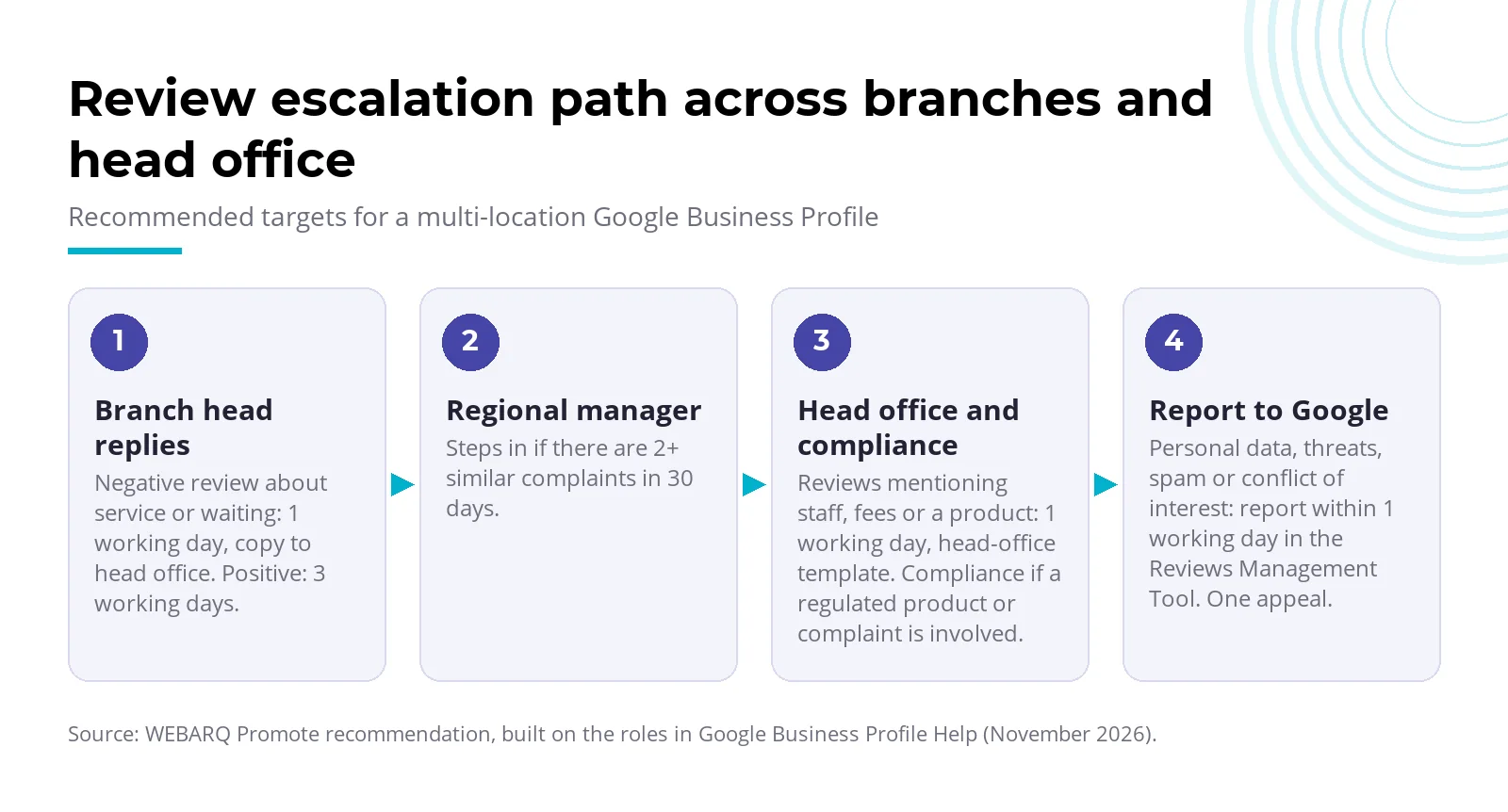
Google only asks businesses to reply in a timely manner, with no hours or days attached, so you set the SLA. We recommend replying to negative reviews within one working day and positive ones within three, and reporting policy-violating reviews instead of arguing in public.
A profile must be verified to reply, and replies are checked against content policy, usually within 10 minutes but sometimes up to 30 days, so the SLA should measure when a reply is sent, not when it goes live. All targets in this WEBARQ framework are our recommendations.
| Review type | Target (recommended) | Owner | Escalation |
|---|---|---|---|
| Positive or neutral | 3 working days | Branch head | None |
| Negative, about service or waiting | 1 working day | Branch head, copy to head office | Regional manager if 2+ similar complaints in 30 days |
| Mentions staff, fees or a product | 1 working day, head-office template | Head office | Compliance if a regulated product or complaint is involved |
| Others' personal data, threats, spam, conflict of interest | Report within 1 working day | Head office | Reviews Management Tool; one appeal |
For financial institutions, Google's content policy bars promotional offers, pricing and purchase links for regulated products, financial services included. A review reply is no place for a promo rate. This section is general information, not legal advice.
Policy-violating reviews: when to flag
Report a review only when it breaks policy. Google says it stays out of disputes between businesses and customers. Evaluation usually takes several days, status shows in the Reviews Management Tool, and you can appeal once, with up to 10 reviews per submission.
The bigger risk is internal. The same policy bans incentives for reviews, selectively asking for positive ones, pressuring customers to review on the premises and giving staff review quotas. Reviews from employees count as a conflict of interest. Fake engagement can lead to removed reviews and a restricted profile, such as a temporary block on new reviews. What's allowed is simple: share a review link or QR code.
How consistent is your branch data across Maps, your site and directories?
Branch data is consistent when name, address, phone, hours, category and URL match across Maps, your branch page and directories. Google builds profiles from several sources, including official websites, licensed third-party data and user contributions, so conflicting data outside the profile matters too.
Auditing name, address, phone and hours
Export the group spreadsheet and compare each column with your location pages and two or three main directories. Fix mismatches at the source, and search Maps for duplicates: one page per location.
| Field | Compare in | Google rule to test against |
|---|---|---|
| Business name | Profile, site footer, directories, signage | Same at all locations; no tagline, hours, phone or neighborhood |
| Address | Profile, site, directories | A real address with signage; no PO box or virtual office |
| Phone | Profile, site, directories | A local branch number; no premium or redirecting numbers |
| Hours | Profile, site, directories | Banks use lobby hours; dealers use new-car sales hours |
| Primary category | Profile, directories | Few and specific; the same for the same service |
| URL | Profile, site | Your own site or location page; not a social media page |
Edits can take up to three days to show. Put the audit results in your monthly Search Console report so the board sees progress.
Why AI answers can repeat inconsistent branch data
We haven't found a Google statement that AI Overviews or AI Mode use Business Profile data. Google does say official websites are one source of profile data, and that profile data reaches third-party apps through Maps Platform APIs.
Our inference: if a branch's hours differ across site, profile and directories, answer engines reading the same web may quote the wrong one. On how AI engines pick citations, see how AI Overviews affect business traffic and what generative engine optimization is. Our AI Search Optimization team checks which version appears for your brand.
What do 30 local searches in Indonesia show?
Across 30 local "category + city" queries, a local pack of three businesses appeared on 28 (93.3%). For a search like "apotek medan" (pharmacy Medan), Maps listings sit above every website.
Method: WEBARQ Promote analysis, November 8, 2026, 30 queries, DataForSEO (serp_organic_live_advanced, location Indonesia, language id, mobile, depth 10). Ten categories, from banks to pharmacies, times Jakarta, Surabaya and Medan; shares below are of 266 organic slots, classified by hand. No brand is named.
| Metric | Result | 95% interval (Wilson) |
|---|---|---|
| Queries with a local pack | 28 of 30 (93.3%) | 78.7%–98.2% |
| Queries with an AI Overview element detected | 3 of 30 (10.0%), a floor | 3.5%–25.6% |
| Brand-owned sites | 83 of 266 (31.2%) | 25.9%–37.0% |
| Social and UGC | 61 (22.9%) | 18.3%–28.3% |
| Marketplaces | 35 (13.2%) | 9.6%–17.7% |
| Directories | 28 (10.5%) | 7.4%–14.8% |
The pattern differs by category. Multifinance got 14 brand-owned slots and one directory or marketplace slot out of 28; pharmacies got only 3 brand-owned slots and 19 directory or marketplace slots. In fragmented categories, your site competes with platforms.
The AI Overview figure is a floor: all three elements were async placeholders the tool can't load, so other queries may show one too.
Naming rules don't enforce themselves either. We saw at least 10 of the 84 local pack entries (about 12%) with names carrying marketing words, a service description or address text.
The limits: results are for Indonesia as a whole, not each city, from a single run. Two queries ("bank jakarta" and "rumah sakit jakarta") match real entity names; without them, brand-owned sites hold 30.4% and directories plus marketplaces 24.8%.
A 30-day plan for your team
- Week 1, inventory. List every profile with its owners and managers, and look for duplicates. Lead: Head of Digital.
- Week 2, access. One business group per brand, two head-office owners, a manager per branch, no shared logins. The CMO signs off on the role matrix.
- Week 3, data. Run the consistency audit, then request bulk verification once you have 10 or more valid profiles.
- Week 4, reviews. Switch on the SLA, have compliance approve reply templates, and schedule a quarterly access review.
One thing not to budget for is paying for rank. Google says local results depend on relevance, distance and prominence, and a better local rank can't be requested or bought. What you control is complete, accurate data.
Frequently asked questions
Is Google Business Profile the same as Google Bisnisku?
Yes. Google Ads Help in Indonesian says Business Profile was previously known as Google Bisnisku. Branch staff may still use the old name, which is widely searched in Indonesia, so pick one name for your internal SOP and stick to it.
How many locations do you need for bulk verification?
You need at least 10 profiles belonging to one business, per Business Profile Help in November 2026. Duplicate, suspended and disabled profiles don't count. Service-area businesses can't use this route, nor can an agency holding several clients' businesses in one account.
Should we use one profile for all branches or one per branch?
One profile per physical location. Google's guidelines allow one page per location, whichever account it sits in. A public-facing department that operates as a separate entity, such as an ATM in a bank, may have its own profile with a distinct name and primary category.
Can we remove negative Google reviews?
Not because you disagree with them. Google only takes down reviews that break its policies, such as spam, threats, conflicts of interest or other people's personal information. Report those, then track them in the Reviews Management Tool. Evaluation usually takes several days, and you can appeal only once.
Who should hold access, the agency or the in-house team?
Our recommendation: ownership stays in-house, with at least two owners at head office. The agency joins as a manager through Google Accounts tied to named people, never a shared login. Access can be revoked anytime, and the profiles stay with you when the contract ends.
Has your branch network passed 10 locations, with data spread across several accounts? The WEBARQ Promote SEO team can map your profiles, access and branch data consistency. The rules and menus above follow Business Profile Help as of November 2026 and may change.