
Google Search Console for Marketing Teams: The Reports to Check Every Month and How to Read Them



By Angelica · Updated October 24, 2026
A marketing team only needs to open Google Search Console once a month, as long as it reads the reports in the right order. Google's Search Console getting-started guide says you needn't sign in daily, since new issues arrive by email, and suggests checking about monthly or when content changes.
Our order: risk reports first, then performance, indexing and Core Web Vitals, then a one-page summary. Search Console shows how Google sees your site, not sales.
Key takeaways
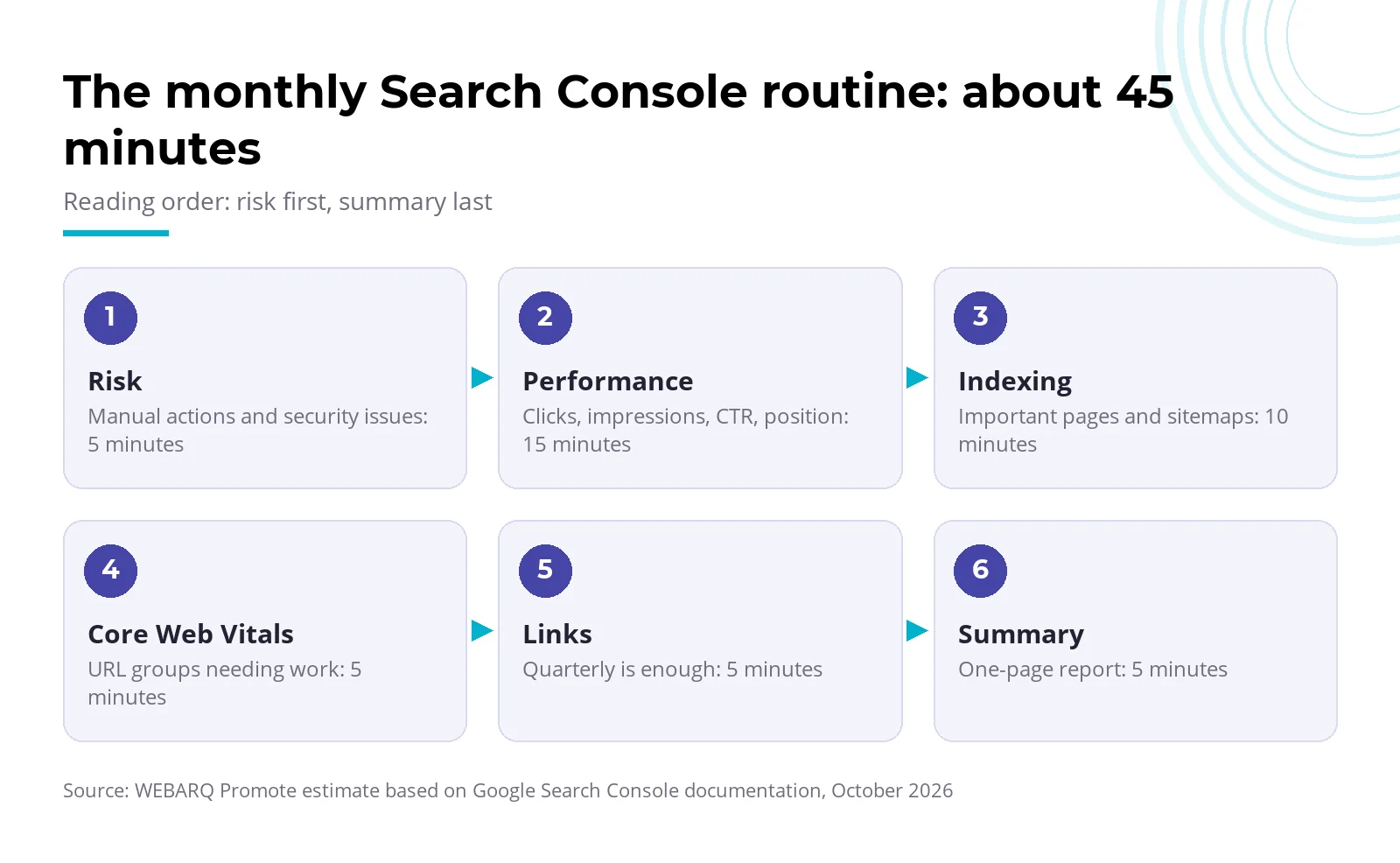
- Google suggests checking about once a month. The routine below takes roughly 45 minutes (a WEBARQ Promote estimate, not a Google figure).
- Google's thresholds: LCP of 2.5 seconds or less, INP of 200 milliseconds or less, CLS of 0.1 or less, at the 75th percentile. A manual action or security issue needs prompt attention; our rule of thumb is the same day.
- Google sets no threshold for falling clicks. Compare with last month and the same month last year, within the 16-month data window.
- Treat non-branded clicks as your growth line. The filter has existed since March 2025.
- The Generative AI performance report shows impressions only and, per Google, has covered all sites since August 31, 2026.
What does Google Search Console measure, and what doesn't it?
Google Search Console is a free Google service for monitoring, maintaining and troubleshooting your site's presence in Google Search. It records what happens before people reach your site: how often pages appear and get clicked, at what position, and whether Google can index them.
Conversions and lead value come after the click and live in Google Analytics; per Google Analytics Help, linked Search Console data arrives there 48 hours after collection. If the board asks what SEO earned, the answer sits in Analytics or your CRM.
A Domain property covers all subdomains plus http and https and is verified by DNS record. A URL-prefix property covers one prefix, such as example.co.id/en/. Crawl Stats exists only for domain-level properties, so verify the Domain property first.
Which reports should you open every month?
Six groups are enough: Manual actions, Security issues, Performance (plus the Generative AI performance report once it appears), Page indexing with Sitemaps, Core Web Vitals, and Links. For anyone who checks only periodically, Google suggests looking for manual actions, security issues, error spikes and sharp drops in clicks.
The table below is the core of the WEBARQ Promote monthly routine. Method: we read the Search Console Help, Search Central and web.dev pages on October 24, 2026, and mapped each report to a business question, an action threshold and an owner. "Google" marks thresholds from official documentation; "rule of thumb" marks our own recommendation. No client data or benchmarks are included.
Table 1. The WEBARQ Promote monthly routine (per Google documentation, October 2026)
| Report | Business question | Action threshold | Owner |
|---|---|---|---|
| Manual actions | Has Google applied a spam action? | Any entry: fix, then request reconsideration (Google) | SEO lead |
| Security issues | Is the site hacked or flagged as harmful? | Any entry: act right away (Google); aim to resolve it the same day (rule of thumb) | Developer, hosting |
| Performance | Is our Google presence rising or falling? | A move lasting several weeks, after checking seasonality (rule of thumb) | Marketing |
| Branded / non-branded | Is growth coming from people new to the brand? | Non-branded clicks keep falling: review topic pages (rule of thumb) | Marketing, content |
| Generative AI performance | How often do we appear in AI Overviews and AI Mode? | No threshold; read as a trend (rule of thumb) | Marketing |
| Page indexing | Are important pages indexed? | Important page hit by 5xx, redirect error, 404, soft 404, robots.txt block or unintended noindex (reasons from Google) | SEO, content |
| Sitemaps | Can Google read the sitemap? | Any status other than Success (Google) | Developer |
| Core Web Vitals | Is real-user experience good enough? | URL groups rated Need improvement or Poor (Google) | Developer |
| Links | Any unfamiliar linking sites? | No threshold; quarterly is enough (rule of thumb) | SEO |
Estimated time: 5 minutes for risk, 15 for performance, 10 for indexing, 5 for Core Web Vitals, 5 for links (quarterly is enough), 5 for the summary.
How do you read the Performance report?
Read four metrics (clicks, impressions, CTR and average position) by query and page, with branded and non-branded queries kept apart. The default view covers three months; set it to one calendar month.
Clicks, impressions, CTR and position
Google's metric definitions say a click counts when a user leaves the results for your site. An impression counts when your link is on the results page the user opened, even unscrolled, unless it's hidden in a carousel or expandable FAQ. CTR is clicks divided by impressions.
Average position is the most misunderstood number: Google takes your topmost position per query and averages it. A director's own search may differ because of history and location. Watch the change.
Why doesn't the table total match the chart?
The gap is expected. Google's guide to Performance dimensions explains that the chart aggregates by property, while a table grouped by Page aggregates by page. Two of your pages on one query count as one impression in the chart, two in the table. Rare, anonymized queries count only toward the chart total, and interface exports stop at 1,000 rows.
Branded vs non-branded queries
The branded filter separates searches containing your brand name; for a CMO it's the most useful split. Branded clicks mostly reflect existing demand from ads or press coverage. Non-branded clicks show whether content reaches new people. History starts in March 2025, low-impression sites don't get the filter, and Google admits the classification can be wrong.
Month on month and year on year
Google gives no threshold for a traffic drop. Our rule of thumb: compare this month with last month and the same month last year, and investigate only moves lasting several weeks.
Google's traffic-drop guidance suggests a 16-month range to spot dips that repeat yearly. In Indonesia, think Ramadan and Lebaran. Data is kept only 16 months, so copy monthly figures into a spreadsheet.
How are AI Overviews and AI Mode impressions counted?
They're already in the Performance report, under the Web search type, with no separate column. All links in one AI Overview share one position. Google announced the Generative AI performance reports on June 3, 2026. They show impressions only, and the Search report stays hidden until a site has enough AI-feature impressions. Google says all sites worldwide have had it since August 31, 2026.
What does the Page indexing report mean for your content?
It shows which URLs are indexed and why others aren't. Look for important pages left out; a big "not indexed" total says little. Google stresses that duplicates, noindex pages, robots.txt blocks and 404s for deliberately removed pages are normal.
Act when a key product, service or article page shows Server error (5xx), Redirect error, Not found (404), Soft 404, or an unintended noindex or robots.txt block. Google says "Duplicate without user-selected canonical" is not an error. "Crawled - currently not indexed" means the page may or may not be indexed later.
For one URL, the URL Inspection tool shows Google's indexed version, the Google-selected canonical next to yours, and a live test. For many pages, Google prefers a sitemap with lastmod over repeated indexing requests. A sitemap status of "Has errors" or "Couldn't fetch" goes to the developer.
Google says sites under 500 pages probably don't need this report. On large corporate or e-commerce sites, crawl budget matters more; start with our technical SEO piece.
Core Web Vitals and page experience: when should you act?
Core Web Vitals are three real-user metrics: loading (LCP), responsiveness (INP) and layout stability (CLS). Act when a URL group is rated Need improvement or Poor. The Core Web Vitals report uses web.dev's thresholds at the 75th percentile, separately for mobile and desktop.
Table 2. Core Web Vitals thresholds (per Google documentation, October 2026)
| Metric | Good | Need improvement | Poor |
|---|---|---|---|
| LCP | ≤ 2.5 s | ≤ 4 s | > 4 s |
| INP | ≤ 200 ms | ≤ 500 ms | > 500 ms |
| CLS | ≤ 0.1 | ≤ 0.25 | > 0.25 |
The data comes from real Chrome users (Chrome UX Report) over the last 28 days, so today's fix shows fully only weeks later. Low-traffic sites may see an empty report because there isn't enough real-user data. Each metric is explained in our Core Web Vitals article.
Leave Page Experience and Mobile Usability off the checklist. In 2023 Google turned the Page Experience report into a guidance page, and Mobile Usability was retired from December 1, 2023. The HTTPS report still exists and is worth a quick look after a site migration.
Why read manual actions, security issues and links even when traffic is up?
They cover risk, whatever the click chart says. A manual action follows when a human reviewer at Google finds pages breaking spam policies; part or all of the site can be demoted or dropped. Per Google's help page on manual actions, the notice also reaches your account's messages. After fixing, file a reconsideration request.
Security issues cover hacked content, malware and social engineering; affected pages can carry warnings in results or the browser. For a bank or a listed (Tbk) company, that's a reputation issue.
The Links report shows top linked pages, linking sites and link text. It's a sample, not a full list, and doesn't flag nofollow, so don't make its total a KPI. Use it to spot unfamiliar linking domains and service pages you rarely link to internally.
A one-page monthly report template for management
One page is enough when each block answers one board question. The template is part of the WEBARQ Promote monthly routine.
Table 3. One-page Search Console report template
| Block | Contents | Source |
|---|---|---|
| 1. Header | Property, period, note "data limited to 16 months" | - |
| 2. Non-branded figures | Clicks, impressions, CTR, position: this month, last month, last year | Performance |
| 3. Pages on the move | Top 5 gains and losses in clicks | Performance |
| 4. Indexing | Important pages not indexed and why; sitemap status | Page indexing, Sitemaps |
| 5. Core Web Vitals | Good, Need improvement and Poor group counts | Core Web Vitals |
| 6. Risk | Manual actions, security issues (yes/no) | Manual actions, Security issues |
| 7. AI impressions | Once the report appears | Generative AI performance |
| 8. Actions | Next month's priority, owner, deadline | - |
Add one sentence under each figure, or fill only blocks 2 and 8 if time is short. Without an owner and a deadline, a monthly report is just an archive.
When is Search Console not enough on its own?
It falls short once the question is about money, the full query list, or your brand in AI answers. For conversions, link it to Google Analytics, which adds the Google Organic Search Queries and Google Organic Search Traffic reports. For queries, the Search Analytics API or a bulk export to BigQuery gets you past the 1,000-row limit.
The Generative AI performance report counts impressions but not whether AI answers mention or recommend your brand. That takes separate monitoring, part of our AI Search Optimization service.
Your first step this month
Verify the Domain property if you haven't. Then open Manual actions and Security issues and record last month's non-branded clicks as a baseline. Fix an unindexed main service page before any new content. Fill in the template, send it to management, and repeat on the same date next month.
Frequently asked questions
Is Google Search Console free?
Yes. Google Search Console is a free Google service for monitoring and troubleshooting how your site appears in Google Search. Your site can appear in results without it, but you won't see query data, indexing status or Google's manual action notices.
Why don't Search Console numbers match Google Analytics?
They measure different things. Search Console counts clicks from Google results, credits them to the canonical URL and dates them in Pacific Time. Analytics counts sessions and conversions on your site and receives Search Console data 48 hours after collection. Compare the direction of the trend, not the totals.
How long does Search Console keep data?
Performance data is kept for 16 months, enough to compare a month with the same month last year. The branded filter only has history from March 2025. For longer history, Google suggests storing data through the Search Analytics API; a monthly spreadsheet works too.
Is a page marked not indexed always a problem?
No. Google treats duplicates, noindex pages, URLs blocked by robots.txt and deliberately removed pages returning 404 as normal. It's a problem when a main service or product page isn't indexed because of a server error, redirect error, soft 404 or unintended noindex. Check those pages with the URL Inspection tool.
Are clicks from AI Overviews counted in Search Console?
Yes. A click on a link inside an AI Overview or AI Mode counts as a click in the Performance report, under the Web search type, mixed with regular results. The Generative AI performance report announced on June 3, 2026 shows AI impressions separately, without clicks, so use it for trends, not ROI.
Want your monthly Search Console report to end in fixes that get done? The WEBARQ Promote SEO team can set up the routine and follow through each month.