

A Board-Ready Marketing Dashboard in Looker Studio: Must-Have Metrics, Layout and Common Mistakes



By Bagas · Updated October 28, 2026
A marketing dashboard your board will actually read needs four pages and 8 to 10 metrics, as long as every number has a definition agreed with Finance before the first chart is built. Most of what ranks for "looker studio marketing dashboard" teaches clicks. Few pages say which numbers belong in a board meeting, or how they survive a director's challenge.
A note on the name: Google has called the product Data Studio since April 2026, and Looker Studio Pro is now Data Studio Pro. Existing reports moved over automatically (Google's announcement, April 13, 2026). The title keeps the name people search for; from here on we say Data Studio.
Key takeaways
- Four pages, one question each: executive summary, channels, funnel, and cost and efficiency (a WEBARQ Promote design).
- Don't add up GA4, Google Ads and Meta conversions. Each uses its own attribution model and window, so the board's official number comes from your CRM or order system.
- The Google Analytics and Google Ads connectors are built by Google, free, and refresh every 12 hours by default. Meta Ads and CRM data come in through partner connectors, Sheets exports or BigQuery.
- A standard GA4 property is capped at 200,000 tokens a day and 10 concurrent requests. Too many charts can trigger a quota error in the middle of the meeting.
- Move to BigQuery when you need to join more than five sources, or tie CRM revenue to ad cost by campaign.
What does a board actually need from a marketing dashboard?
A board needs three answers: is marketing producing growth, what does it cost, and what gets decided next month. In our definition, an executive dashboard is a report with one view per business question, built from metrics with agreed definitions, a comparison period, a target and a one-line takeaway.
Existing content rarely answers it. A WEBARQ Promote analysis on October 28, 2026 (DataForSEO, location Indonesia, 10 queries such as "dashboard looker studio" and "marketing report for board of directors", top 10 organic results, judged from titles and snippets) found no article on a board-level marketing dashboard in Looker Studio or Data Studio. Board marketing report guides appeared for two queries, all generic and tool-neutral.
Board vs team: one page of answers, not 40 charts
Your paid media team needs CTR, CPM and search terms daily. Your board doesn't. Since Data Studio is free for report creators and viewers, it's tempting to put every chart in one shared file.
Keep them apart. The team version can hold dozens of charts, while the board version carries only the numbers Marketing and Finance will defend together.
Which four pages are enough for a board meeting?
Four pages are enough: executive summary, channels, funnel, and cost and efficiency. Each answers one question, holds at most six tiles, and compares this month with last month, the same month last year and the target. This structure is a WEBARQ Promote design, a recommendation, not survey or campaign data.
| Page | Question it answers | Tiles | Takeaway written by a person |
|---|---|---|---|
| 1. Executive summary | Is marketing producing growth at an acceptable cost? | Ad spend, recorded leads (CRM), blended CPA, revenue from marketing, MER, status vs target | The biggest change vs last month |
| 2. Channels | Which channels deserve more budget, and which less? | Spend, leads, cost per lead, sessions and key events (GA4), revenue share, all by channel | Proposed budget reallocation |
| 3. Funnel | Where do prospects drop out? | Sessions, key events, MQL, SQL, closed won, with stage-to-stage rates | The weakest stage and its owner |
| 4. Cost and efficiency | Is cost growing faster than results? | Spend vs budget, cost per SQL, monthly CAC, 6-month CPA trend, ROAS vs MER | Next month's budget decision |
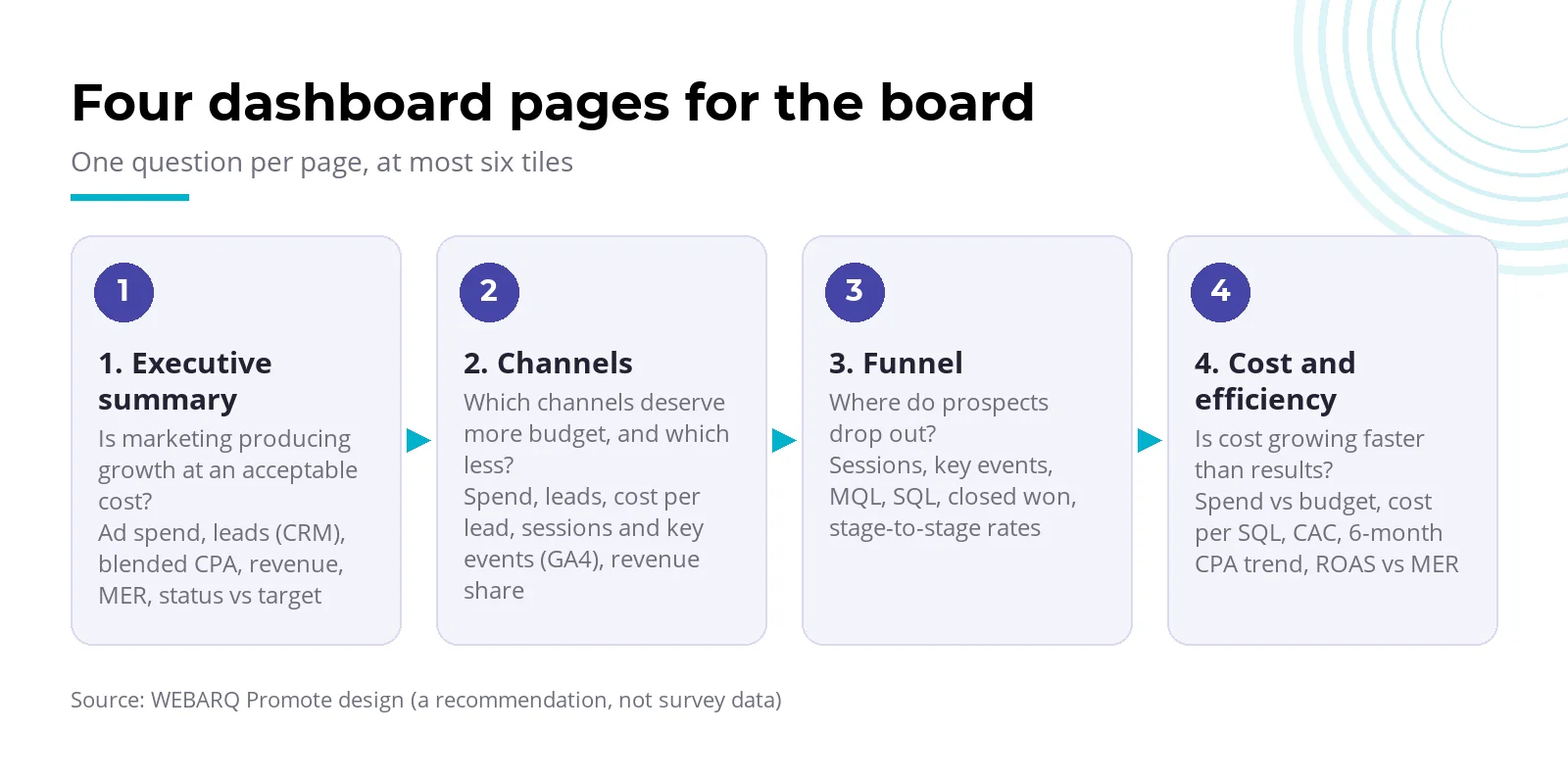
Three design rules apply throughout. Each tile title names a metric defined in the next table. Every number has a target and a comparison. A footer lists source, owner and refresh time; Data Studio itself shows the last update time at the bottom left of a report.
Page 1. Executive summary
This is the only page every director reads. A person writes the takeaway, for example (illustrative figures): "Spend up 12%, CRM-recorded leads up 4%, the gap is in Meta."
Page 2. Channels
Platform-reported numbers sit next to CRM numbers, clearly labeled. Without labels, the board will add them together.
Page 3. Funnel
This page shows the leak. If form leads rise while SQLs stay flat, the problem is lead quality or the sales process, each with a different owner. We cover that in our piece on lead quality for insurers and multifinance companies.
Page 4. Cost and efficiency
This page answers the CFO. Platform ROAS sits next to MER, showing whether platform claims match the revenue Finance has booked.
Which metrics are essential, and how should you define them?
An essential metric is one whose formula, source and owner you can state in one sentence. For most companies that means ad spend, recorded leads or orders, blended CPA, MQL, SQL, revenue, MER and ROAS. The formulas are our recommended definitions; platform behavior was checked against official documentation as of October 2026.
| Metric | Formula | Source | Owner | Common trap |
|---|---|---|---|---|
| Ad spend | Google Ads + Meta + other spend, one currency | Google Ads connector; Meta via partner connector or Sheets | Marketing | Some include agency fees, some don't |
| Key events (GA4) | Count of events marked as key events | GA4 | Analytics | Formerly "conversions"; not Google Ads conversions |
| Google Ads conversions | The Conversions column | Google Ads | Paid media | Includes modeled conversions and follows the attribution model |
| Meta conversions | Results per ad set under its attribution setting | Meta Ads Manager | Paid social | Different windows from Google; not comparable across models |
| Platform CPA | Cost / conversions in that platform's column | Each platform | Paid media | Every platform claims the same conversions |
| Blended CPA | Total spend across channels / conversions counted once in the CRM or order system | Spend: platforms; conversions: CRM | Marketing + Finance | Hiding the platform figures inside it |
| MQL | Lead that passes Marketing's scoring threshold | CRM | Marketing | No standard exists; agree it in writing with Sales |
| SQL | Lead accepted by Sales after qualification | CRM | Sales | Counts only once Sales has accepted it |
| ROAS | Conversion value / ad cost | Google Ads, Meta | Paid media | Depends on value tracking and the attribution model |
| MER | Total revenue / total marketing spend across channels | Finance | Finance | Picks up non-marketing revenue unless scoped |
The usual argument is attributed vs total conversions. Attributed conversions are those a platform credits to its own ads; total conversions are everything in the CRM, whatever the source. Add up several platforms' claims and you count one buyer two or three times.
The documentation explains why. According to Google Analytics Help, important events in GA4 are now called key events, while "conversions" refers to actions used to measure ads and bidding, and the two numbers can differ because the attribution model, window and date scope are not the same. The Google Ads Conversions column also includes modeled conversions, which are estimates for conversions Google can't observe directly.
The Google Ads attribution models on offer are last click and data-driven; data-driven is the default for most conversion actions, and the model you choose changes both the Conversions column and automated bidding such as target CPA. On Meta, the standard attribution settings for website conversions include 1 or 7 days after a link click and 1 day after an impression. Meta's own advice: if you use an external analytics tool, judge performance there.
Where does the data come from? Mapping GA4, Google Ads, Meta and CRM
GA4 and Google Ads come in through free connectors built by Google; Meta Ads and your CRM don't. Per Data Studio's data source documentation, Google-built connectors cover Sheets, Ads, Analytics and other services in the Google Marketing Platform family, while partner connectors come from third parties and may charge a fee. For Meta Ads and Salesforce, the Data Studio release notes list third-party partner connectors. Documentation as of October 2026:
| Source | Connector type | Refresh | Limits to know |
|---|---|---|---|
| GA4 | Built by Google, free | 12 hours by default (1, 4 or 12 hour options) | Data API quotas; filtering by a calculated field leaves the summary total empty |
| Google Ads | Built by Google, free | 12 hours | The Conversions column includes modeled conversions |
| Meta Ads | Partner connector (may be paid) or export to Sheets/BigQuery | Depends on the connector | Attribution windows differ from Google's |
| CRM | Partner connector, CSV/Sheets export, or database/BigQuery | Depends on the method | CSV uploads need manual refresh; customer data needs governance |
| Google Sheets | Built by Google | 15 minutes by default | A practical bridge for monthly CRM exports |
| BigQuery | Built by Google | 12 hours by default | BigQuery query charges apply on every refresh |
These refresh figures come from the data freshness page, which also says a blended source takes the freshness of its most frequently refreshed part. If Monday morning's numbers lack Sunday night, check this 12-hour cycle first.
GA4 quotas are less well understood. The Google Analytics Data API caps a standard property at 200,000 core tokens a day, 40,000 an hour and 10 concurrent requests; an Analytics 360 property gets 2,000,000 tokens a day and 50 concurrent requests. The docs give no safe number of charts. If you see "Exhausted concurrent requests quota", Data Studio's troubleshooting guide suggests owner's credentials, fewer charts, a static data extract, or exporting GA4 to BigQuery.
For CRM data, make sure the legal basis and access rights for customer data are clear before pulling it into a shared dashboard. This is general information, not legal advice.
Which mistakes do the most damage to a board's trust?
The costliest mistake is a number that changes depending on who asks. Once a board finds two lead counts for the same month, every later dashboard gets read with suspicion. Six common causes:
- Definitions nobody agreed. Marketing counts form leads, Sales counts leads it actually called.
- Platform numbers added together. Google Ads and Meta both claim the same buyer.
- No comparison. This month's lead count means nothing without last month, last year and the target.
- Vanity metrics. Impressions and followers on the summary page pull attention away from cost and revenue.
- No owner. When a number looks odd, nobody is responsible for explaining it.
- Stale data with no label. An extract or CSV last refreshed three weeks ago, with no date on it.
If you already run a monthly Google Search Console review, put the board dashboard on the same cycle, after Finance closes the books.
When is Data Studio (formerly Looker Studio) the wrong tool?
Data Studio is a poor fit when board answers depend on joining CRM revenue with campaign-level ad cost at scale. Blending in Data Studio is limited to five sources, join conditions support equality only, and a blend can't be reused in another report.
Other warning signs: repeated GA4 quota errors, mounting partner connector fees, or a team copying CSVs at the start of every month. At that point, pull everything into BigQuery and keep Data Studio as the display layer. BigQuery query charges then apply on every refresh, so have your data team estimate them first.
For a company with two ad channels and a simple CRM, Data Studio plus Google Sheets is usually enough. Don't build a data warehouse for a problem a monthly export can solve.
Checklist before you open Data Studio
Do these five things outside the tool:
- Write down the board's four questions, one per page.
- Pick 8 to 10 metrics and fill in formula, source and owner as in the table above.
- Sign off the MQL, SQL and blended CPA definitions with Sales and Finance.
- Map every metric to its connector, including the ones that need a partner connector or an export.
- Set the data close date and decide who writes the takeaway each month.
Then open Data Studio. The hard part is the definitions, not the tool. For a framework on measuring ROI at channel level, see our article on performance marketing.
Frequently asked questions
Is Looker Studio, now called Data Studio, free?
Yes. Google's product page (accessed October 28, 2026) says Data Studio is free for report creators and viewers. Data Studio Pro is a paid per-user monthly subscription with admin, team content management and support. Costs can still come from partner connectors for non-Google data such as Meta Ads, and from BigQuery query charges.
What is Looker Studio, and how is it different from Looker?
Looker Studio is Google's free reporting and data visualization tool, called Data Studio again since April 2026. Looker is a separate product, Google's enterprise business intelligence platform. Google says Data Studio will complement Looker rather than replace it, and existing reports carry over without migration work.
Is there a Looker Studio dashboard template for a board?
Plenty of Data Studio templates exist, but nearly all are built for channel teams, not board meetings. A template speeds up layout; it doesn't settle definitions. Start from the board's four questions, agree each formula with Finance, then pick or build a template that follows that structure.
Can GA4 connect to Data Studio directly?
Yes. The Google Analytics connector is built by Google, free, and refreshes every 12 hours by default. The limit is the Data API quota: a standard property gets 200,000 core tokens a day and 10 concurrent requests. Busy dashboards can hit quota errors; Google suggests exporting GA4 to BigQuery as the fix.
How many KPIs should a board dashboard show?
We recommend 8 to 10 core metrics across four pages, with at most six tiles per page. That's a design choice, not an industry standard. The test: you can state each metric's formula, source and owner in one sentence. Metrics that fail it belong on the team dashboard.
Want a board dashboard whose numbers match Finance's? Our Performance Marketing team can help you set the metric definitions, the data-source map and the reporting rhythm.